We need GPU access to run neural networks. For those who are out shopping, there’s a good shopping guide out there. Here’s an overview and brief comparison of cloud resources I tried.
Google Colab
My first stab was Google Colab. My first GPU experience, free of charge. Felt great until Python ran slower and slower — slower than my baby Dell XPS 15 9370.
Amazon Sagemaker
Second stab was Amazon Sagemaker. Set up most aspects alright and reached the point where I had to request for instance limit increase from 0 to 1, which is a standard process for everyone. I submitted the request on Nov 17, 2018 07:35 PM. Approval came Nov 18, 2018 09:29 PM. Between those times I managed to:
- ponder over the various jargons: S3, T2, ML, …;
- read Amazon SageMaker: Developer Guide on Kindle;
- decided to come back to AWS later and meanwhile, try Paperspace.
Paperspace
Third stab was Paperspace, which offers GPU access at the affordable end. Rather promising, until the GPU+ machines became less and less available. Each time I tried starting one, I get the rude greeting:
Error! We are currently out of capacity for the selected VM type
So, either keep trying (and get no work done) until one becomes available, or pay for one which is more costly. Among the pricy ones, some would return:
Warning: You are starting this notebook in a different cluster/region than the original notebook. This means that your persistent /storage directory will not be the same as the storage in this new region.
I do have a little warning to share: unless you’d like to, there is no need to pay $8 per month for a Gradient 1 subscription. I certainly don’t need one, as there’s no way I could multitask 50 jobs, 5 concurrent notebooks and 5 concurrent jobs. I paid for the subscription once, upon getting the message that I had hit the 10-notebook limit and that I should upgrade to Gradient 1 to continue using Paperspace.
Whether that was a miscommunication or misunderstanding, never mind. The point is I should have just deleted earlier notebooks to keep the total number of notebooks <=10.
The thing is we have to stop the notebook when not using it, otherwise the billing meter would keep running. And then when we need to use the resource again, we have to start the notebook again. Starting a notebook always creates a new notebook. So if we break for 3 meals a day we end up getting 3 additional notebooks, which means we can easily hit the limit of 10 within a couple of days. The way to go is just delete earlier ones.
Clouderizer
4th stab was Clouderizer. The main problem was I could see my fast.ai files in Jupyter terminal. But on Google drive, I only got a skeleton of empty
directories and subdirectories. data, code, out were all empty under Clouderizer > Fast.ai. Prakash came back with a few exchanges, even cloned and tried at his end… so my time on Clouderizer was shortlived.
Google Cloud Platform
5th stab was Google Cloud Computing. So far so good. I have still $300+ credits to go so shall settle for this until I use up the credit. Shall probably then work around Google Cloud Computing and Amazon EC2.
How does billing compare?
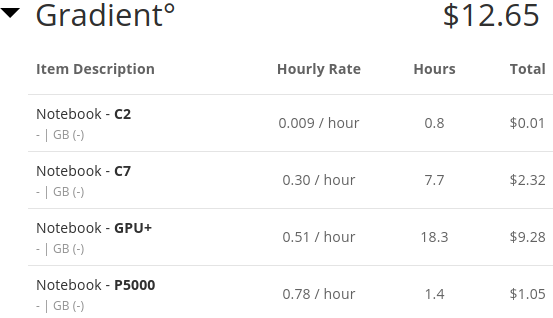
Paperspace: minimum breakdown of details
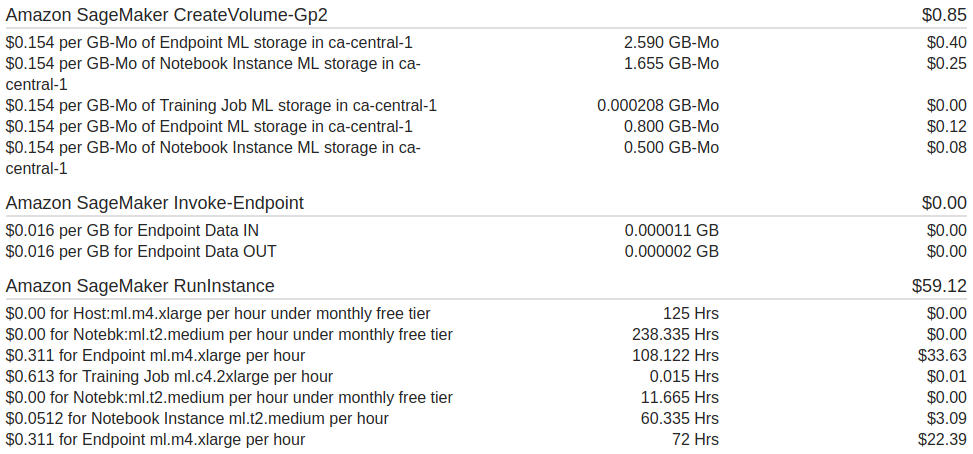
Amazon AWS
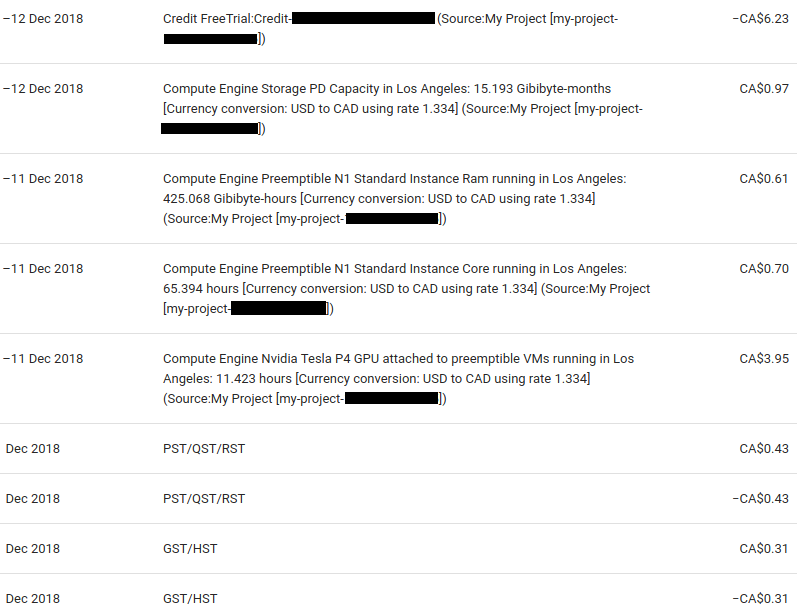
Google Cloud Platform: best level of transparency and details